Independent affiliate guide
ElevenLabs Malaysia: AI Voice, Pricing and Product Guide Setup
Compare narration workflows, check commercial rights, and turn approved software instructions into captioned product tutorials.
By Anchor Sprint · Checked
A real product screen, with a proposed narration
This Anchor Connector screenshot shows a test company. The script below is prepared for this tutorial. Generated audio is not included.
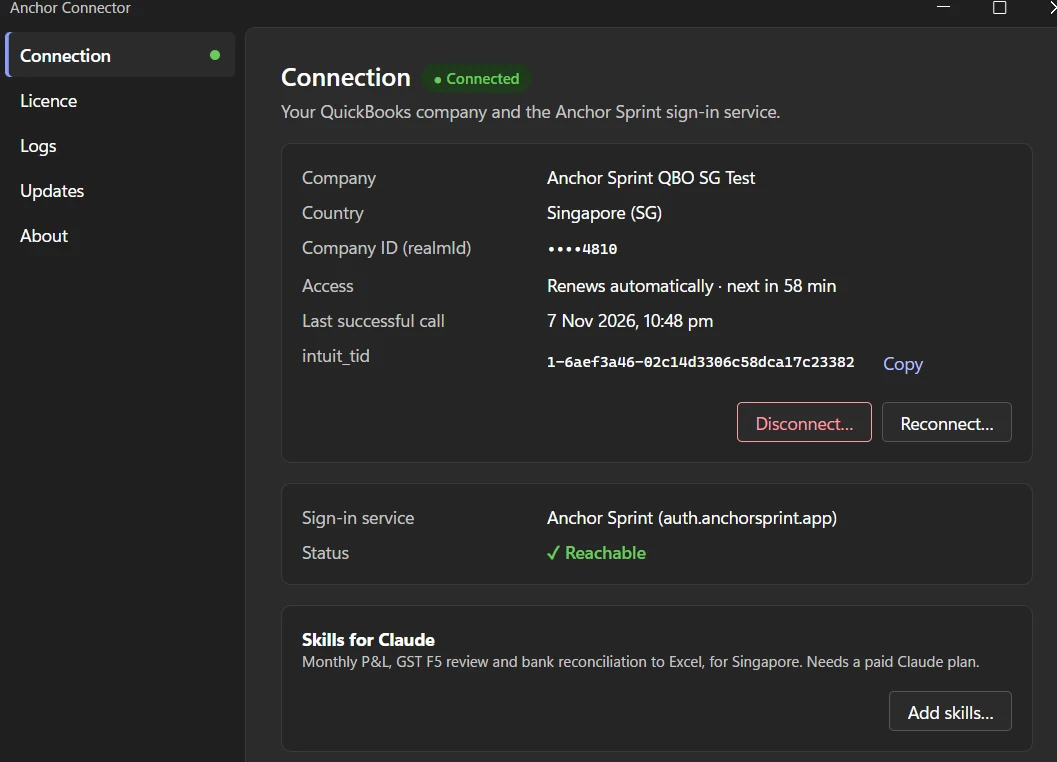
Open Connection. Confirm that the connection status is Connected. Check the company name before you continue. Confirm that the service status is Reachable. If the company is incorrect, stop and check your setup.
Match the words “Connected” and “Reachable” to their visible status labels. Pause between checks so viewers can inspect the screen.
Download the script, checklist, and API starter kit (ZIP)No email required. The starter code is provided for review; it has not generated this example.
Choose an ElevenLabs workflow for your product guide
Use ElevenLabs when a verified product script needs narration, or an existing video needs another language. Keep the actual software interface in the recording.
For a first tutorial, start with one task, one audience, and one language. A clear two-minute walkthrough is easier to maintain than a long feature tour.
| Your starting point | Suggested route | What your team still owns |
|---|---|---|
| A written software guide | Generate narration, then combine it with a real screen recording in Studio. 3 | Script accuracy, screen capture, pacing, captions, and final approval. |
| An existing product video | Upload the recording and align generated speech on the Studio timeline. 4 | Removal of old narration, audio levels, technical terminology, and visible customer data. |
| Many frequently updated guides | Use the speech API with timing data and your own rendering workflow. 6 | Version control, job scheduling, retries, credit limits, file storage, and release checks. |
| A video for another market | Assess the documented dubbing options and their current availability. 7 | Translation review, selected feature licensing, pronunciation, and timing. |
An interactive voice agent is a different product workflow. Narrating a tutorial does not require giving an agent access to customer systems.
ElevenLabs pricing in Malaysia: compare the right billing terms
The following reference uses published Creative plan prices checked on 29 November 2026. Promotions, annual commitments, taxes, and checkout terms can change the payable amount. 1
Prices are in US dollars. For a Malaysian budget, use your bank's conversion and actual invoice charges. These are not fixed Ringgit quotations from Anchor Sprint.
| Plan | Published monthly reference | Pilot decision |
|---|---|---|
| Free | US$0 | Explore the interface. Do not use free-plan output for a commercial product demo. |
| Starter | US$6 | Consider a small commercial narration pilot after checking current allowances and feature eligibility. |
| Creator | US$22 | Compare available usage and production features against your actual narration workload. |
| Pro | US$99 | Evaluate higher-volume or format requirements against the current plan details. |
| Business or Enterprise needs | Different plans or a negotiated quote | Confirm account controls, contractual terms, required formats, and production volume directly. |
Free-plan output has no commercial licence. Paid-plan commercial rights remain subject to content rights and applicable feature terms; Beta Services have separate restrictions. 2
Our suggestion: price one approved tutorial before choosing a larger plan. Count rejected takes and corrected pronunciation, not only the final audio duration.
Malay, English, and Mandarin voiceovers: test the selected model
Language support and input limits differ by speech model. Check the model's documented language list before preparing a Malay or Mandarin recording. 5
Use a short test containing product names, Malaysian place names, abbreviations, numbers, and mixed-language terms. Ask a fluent reviewer to check the result.
Maintain one approved script per language. A translated tutorial must still match the interface labels and the product version shown on screen.
- Keep a pronunciation list for product names and business terms.
- Check pauses before instructions that require a click or a change of screen.
- Confirm the chosen voice's permitted use. Obtain appropriate consent before using another person's cloned voice.
- Publish a readable transcript and captions alongside the voiceover.
Create your first product voiceover in Studio
ElevenLabs documents a video workflow with uploaded media, speech generation, a timeline, and captions. The interface can change between releases. 4
Choose a small product task
Define what the viewer should complete. Use a test workspace and an approved product version.
Prepare the recording and script
Record the real interface. Write short instructions that describe the visible actions and their expected results.
Select the voice and model
Check language support and commercial rights. Test difficult names before generating the full script.
Arrange the clips
Upload the recording and generate speech. Place the video and speech clips on the timeline.
Align and caption the tutorial
Match each spoken step to the visible action. Review the caption text and adjust the timing.
Approve and export
Check the complete video with audio enabled. Save the script, product version, and approved export together.
For source files, narration examples, and an API workflow, read our product-guide voiceover tutorial.
Estimate the cost of an approved tutorial
A subscription price alone does not measure production cost. Include generation, editing, review, translation, and rework in the same estimate.
Cost per approved tutorial =
  (allocated subscription + additional usage + rendering/storage
   + script review + editing + language review + rework)
  / approved tutorials

Record: script version, model, voice, language, generated takes,
credits used, review time, and the approved output version.
Set a maximum number of attempts per scene. A failed automated request should return an actionable error instead of retrying indefinitely.
When ElevenLabs fits, and when another workflow may fit better
- Consider it when you need repeated narration, a consistent approved voice, or several reviewed language versions.
- For a single informal update, a clear human recording may require less setup and review.
- For rapidly changing interfaces, keep scenes short so one changed screen does not require rebuilding the entire tutorial.
- Generated speech cannot verify the truth of your product instructions. A product owner must approve the guide.
- Do not upload customer records, credentials, or private interface captures without the necessary approval and handling controls.
Frequently asked questions
Can I use ElevenLabs for commercial product tutorials?
Check the account plan and the feature terms before generation. The free plan excludes commercial use. Paid-plan rights remain subject to content rights and applicable product restrictions.
Does ElevenLabs record the software interface for me?
This workflow uses a real recording supplied by your team. ElevenLabs provides narration and editing tools; your team verifies the software steps and the finished tutorial.
Can I create a Malay voiceover?
Check the selected model's current language support. Test Malay names, abbreviations, and mixed-language terms with a fluent reviewer before publishing.
Is Anchor Sprint an official ElevenLabs partner?
Anchor Sprint participates as an independent affiliate. Affiliate participation does not establish official partner status or vendor endorsement of our content or services.
Must I give Anchor Sprint my email before trying ElevenLabs?
No. The Try ElevenLabs buttons open the affiliate referral link directly. Check the current ElevenLabs registration and plan terms on its website.
Can Anchor Sprint help with the production workflow?
We can scope script preparation, software documentation, integration, and review procedures for your environment. This assistance is separate from ElevenLabs subscriptions and affiliate participation.
Research references
Official documentation checked on 29 November 2026. Prices and features can change. Workflow recommendations are our interpretation. We have not measured production savings.
- ElevenLabs: current Creative pricing
- ElevenLabs: publishing and commercial rights
- ElevenLabs: Studio overview
- ElevenLabs: video voiceover workflow
- ElevenLabs: speech models and language support
- ElevenLabs: speech generation with timing
- ElevenLabs: dubbing capabilities and product versions
- ElevenLabs: Creator Affiliate Program terms
- ElevenLabs: affiliate dashboard and custom links
ElevenLabs and the ElevenLabs logo are registered trademarks or trademarks of ElevenLabs, Inc. Used with permission. Anchor Sprint is not sponsored by, endorsed by, or affiliated with ElevenLabs except as an independent participant in the ElevenLabs Creator Affiliate Program.
Need help with scripts, integration, or release checks? Discuss a production workflow with Anchor Sprint. Our services are separate from your ElevenLabs subscription. ElevenLabs is a trademark of its respective owner. Affiliate participation does not imply vendor endorsement.